
Last reviewed: September 2026
A Windows spanned volume combines unallocated space from two or more dynamic disks into one logical volume. Windows fills available extents across the participating disks, but the layout provides no redundancy.
Important: dynamic disks are deprecated for most new deployments. Microsoft recommends newer storage technologies for new designs. Treat an existing spanned volume as legacy storage and plan migration rather than expansion whenever practical.
When a spanned volume may still appear
- An existing legacy Windows server already uses dynamic disks.
- A temporary lab combines spare capacity and the data is disposable.
- A migration requires short-term access to a previously created dynamic volume.
When not to use one
- Boot or operating-system storage.
- Databases, virtual machines or the only copy of important data.
- Any workload requiring fault tolerance or predictable recovery.
- A new deployment where Storage Spaces, hardware RAID or managed cloud storage is available.
Compare Windows volume layouts
| Layout | Data placement | Redundancy | Typical purpose |
|---|---|---|---|
| Spanned | Uses extents across two or more disks | No | Combine capacity |
| Striped | Writes blocks across multiple disks | No | Increase throughput |
| Mirrored | Writes identical data to two disks | Yes | Survive one-disk failure |
| Storage Spaces mirror | Pools disks and stores multiple copies | Yes | Modern resilient Windows storage |
Safety checks before changes
- Create and test a backup stored outside the affected disks.
- Confirm disk health and review storage-related events.
- Record disk numbers, sizes, serial numbers, volume labels and drive letters.
- Verify that applications and backup software support dynamic volumes.
- Schedule downtime and define a rollback or restore path.
- Never experiment on the only copy of data.
Create a spanned volume in Disk Management
Use these steps only when maintaining a justified legacy configuration. Creating the volume can convert selected basic disks to dynamic disks, which changes compatibility and recovery behavior.
- Open Disk Management with diskmgmt.msc.
- Confirm that at least two non-system disks contain unallocated space.
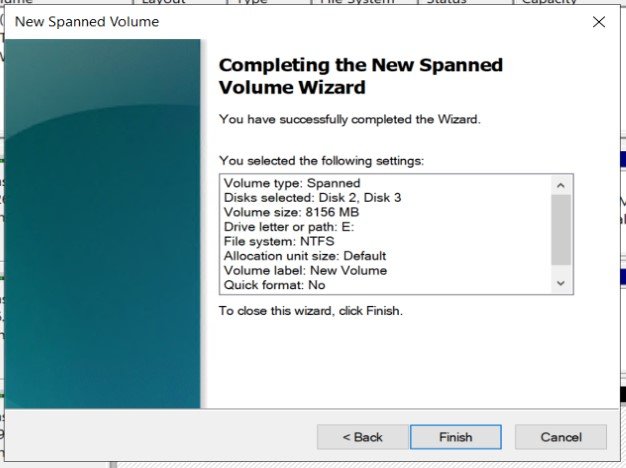
- Right-click unallocated space and select New Spanned Volume.
- Add the intended disks and specify the amount from each disk.
- Assign a drive letter or mount path.
- Format the volume with the required file system and a clear label.
- Verify volume status, capacity and read/write access.
- Run and document a restore test before placing data on the volume.
Inventory disks and volumes with PowerShell
Get-Disk
Get-PhysicalDisk
Get-Volume
Get-PartitionThese commands are read-only inventory checks. Match disk numbers and sizes with the physical or virtual disks before any storage change. Do not run destructive disk commands until the target and backup are independently verified.
How a disk failure affects the volume
Every participating disk is part of the same logical volume. If one disk fails or becomes unavailable, the file system and files across the span can become inaccessible. Replacing a failed disk does not rebuild the missing data because a span has no redundant copy.
For a failed or degraded span, stop writes, preserve the remaining disks, record their order and identifiers, and restore from a tested backup. If no backup exists and the data is valuable, avoid reinitializing disks or recreating the volume; consult a qualified recovery specialist.
Backup and monitoring
- Keep at least one tested backup outside the spanned volume.
- Monitor disk health, controller alerts and Windows storage events.
- Use clear labels and maintain a map of every participating disk.
- Test recovery after configuration or application changes.
- Document recovery time and recovery point objectives.
- Migrate important workloads to a supported resilient storage design.
Common mistakes
- Assuming combined capacity also provides protection.
- Extending the only copy of important data without a verified backup.
- Converting disks without checking application and recovery-tool compatibility.
- Removing, reinitializing or changing one participating disk.
- Confusing a spanned volume with a mirrored or parity layout.
- Keeping a legacy span simply because it has not failed yet.
Recommended alternatives
For a new Windows deployment, evaluate Storage Spaces with mirror or parity resiliency, a hardware RAID controller, or managed cloud disks. Select the design according to capacity, performance, fault tolerance, rebuild behavior, recovery objectives and operational support.
Official references
Join the discussion
0 CommentsAsk questions, add context, or share what worked.
More from Melochip Editorial

Learn what Playwright testing is, why modern QA teams use it, how testers can get started, and the major types...
7 min read · Sep 19, 2026

Learn how Kubernetes Deployments and ReplicaSets work with practical YAML, scaling, self-healing, rolling upda...
7 min read · Sep 17, 2026

Learn Kubernetes security best practices with RBAC, Secrets, ServiceAccounts, Pod securityContext, NetworkPoli...
6 min read · Sep 17, 2026Related articles

Learn Docker environment variables and secrets, including docker run -e, env files, Compose environment, secre...
2 min read · Sep 17, 2026
Prepare for Docker interviews with practical questions and real-time scenarios covering images, containers, Do...
2 min read · Sep 17, 2026
Learn what Playwright testing is, why modern QA teams use it, how testers can get started, and the major types...
7 min read · Sep 19, 2026
Learn how Kubernetes Deployments and ReplicaSets work with practical YAML, scaling, self-healing, rolling upda...
7 min read · Sep 17, 2026Stay in the loop. Get new Melochip articles
Receive Melochip article updates when new articles are available. Explicit opt-in only.
No comments yet. Start the discussion.