Rust Strings and Slices: String, &str, UTF-8, Indexing and Safe Text Handling article illustrationContents
Text handling is where Rust's ownership and borrowing rules become very practical. Rust has more than one string type because owned, growable text and borrowed text have different memory and lifetime requirements.
The two types you will use most often are String and &str.
Stack Heap +----------------------+ +----------------------+ | ptr -----------------+----->| H e l l o , R u s t | | len | +----------------------+ | capacity | +----------------------+
The String value tracks a pointer, length and capacity while owning the heap buffer.
This flexibility is why read-only function parameters often prefer &str instead of &String.
String slices
A slice references part of a string without owning it:
bash
fn main() { let message = String::from("hello rust"); let hello = &message[0..5]; let rust = &message[6..10]; println!("{hello}"); println!("{rust}"); }
bash
message: h e l l o r u s t index: 0 1 2 3 4 5 6 7 8 9 └───────┘ └─────┘ &str &str
Range shorthand
bash
let text = String::from("hello rust"); let a = &text[0..5]; let b = &text[..5]; // same start: zero let c = &text[6..]; // from byte 6 to end let d = &text[..]; // complete string slice
Important: Rust strings are UTF-8
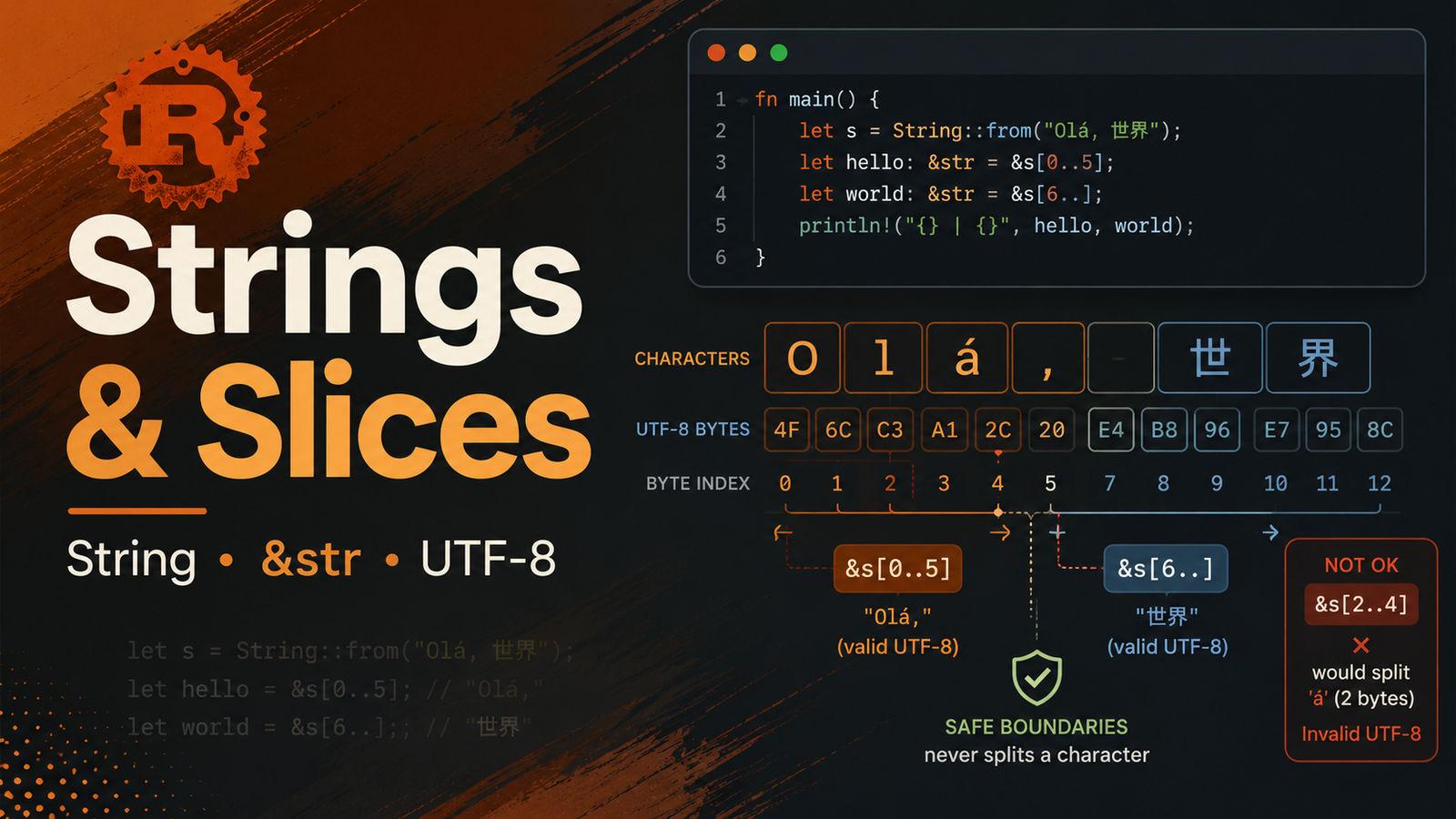
Rust stores String and str text as UTF-8. A visible character does not necessarily occupy one byte.
Because of this, Rust does not support arbitrary integer indexing such as:
bash
let text = String::from("hello"); // let first = text[0]; // not allowed
Integer indexing would be ambiguous and could split a UTF-8 encoded character incorrectly.
Slicing must use UTF-8 character boundaries
Byte ranges used for a string slice must fall on valid character boundaries. An invalid boundary causes a runtime panic when that slicing expression executes.
Therefore, do not assume that character positions and byte offsets are always the same.
Iterate over Unicode scalar values with chars()
bash
fn main() { let text = "Rust 🦀"; for ch in text.chars() { println!("{ch}"); } }
Iterate over bytes
bash
fn main() { for byte in "Rust".bytes() { println!("{byte}"); } }
Choose chars() when you want Unicode scalar values and bytes() when byte-level processing is intentional.
Concatenate strings
Using push_str
bash
let mut full = String::from("Rust"); full.push_str(" Language");
Using format!
bash
let language = "Rust"; let level = "Beginner"; let message = format!("{language} - {level}");
format! is convenient because it creates a new String without making you manually manage concatenation ownership.
Using +
bash
let first = String::from("Hello, "); let second = String::from("Rust"); let combined = first + &second; println!("{combined}"); println!("{second}");
Notice that first is consumed by this operation, while second is borrowed.
Useful String methods
Method
Purpose
len()
Length in bytes
is_empty()
Check whether length is zero
push()
Append one char
push_str()
Append a string slice
trim()
Return slice without leading/trailing whitespace
contains()
Check for a pattern
replace()
Create text with replacements
split()
Iterate over separated pieces
lines()
Iterate over lines
to_uppercase()
Create uppercase representation
Parsing text into numbers
bash
fn main() { let input = "42"; let number: i32 = input.parse().expect("valid integer"); println!("{}", number * 2); }
For production code, prefer handling the returned Result instead of assuming input is always valid.
Practical example: first word
bash
fn first_word(text: &str) -> &str { for (index, byte) in text.bytes().enumerate() { if byte == b' ' { return &text[..index]; } } text } fn main() { let sentence = String::from("Rust ownership matters"); let word = first_word(&sentence); println!("First word: {word}"); }
The function returns a slice that remains tied to the input text rather than allocating a new String.
Why slices improve correctness
Suppose a function returned only an integer position for the end of the first word. That number has no direct relationship to the string after the function returns. A &str slice expresses the relationship in the type system: the result refers to the original text.
Array slices work similarly
bash
fn main() { let values = [10, 20, 30, 40, 50]; let middle: &[i32] = &values[1..4]; println!("{:?}", middle); }
Slices are not limited to strings. &[T] is a borrowed view into a contiguous sequence of values.
String ownership examples
Move
bash
let a = String::from("Rust"); let b = a; // a is no longer usable
Borrow
bash
let a = String::from("Rust"); let b: &str = &a; println!("{a} {b}");
Clone
bash
let a = String::from("Rust"); let b = a.clone(); println!("{a} {b}");
Common mistakes
Trying to index a String with [0] .
Assuming len() always means human-visible character count; for strings it reports bytes.
Slicing at invalid UTF-8 boundaries.
Accepting &String when &str would make an API more flexible.
Cloning strings unnecessarily instead of borrowing.
Hands-on mini lab: command parser
bash
cargo new string_lab cd string_lab
Create a program that reads a command such as:
bash
deploy production
Then:
Use trim() .
Split the line with split_whitespace() .
Read the command and environment as &str values.
Print a formatted confirmation using format! or println! .
Handle missing values instead of indexing blindly.
Key points
String owns mutable/growable UTF-8 text.
&str borrows string data.
String literals are commonly &str .
Rust strings cannot be arbitrarily integer-indexed.
String slice boundaries must be valid UTF-8 boundaries.
Use chars() or bytes() depending on the representation you need.
Prefer borrowing over unnecessary cloning.
Next chapter
Next, combine related values into your own types with Chapter 9: Rust Structs and Methods.
Official reference
See the official Rust Book sections on Slices and Strings.







No comments yet. Start the discussion.