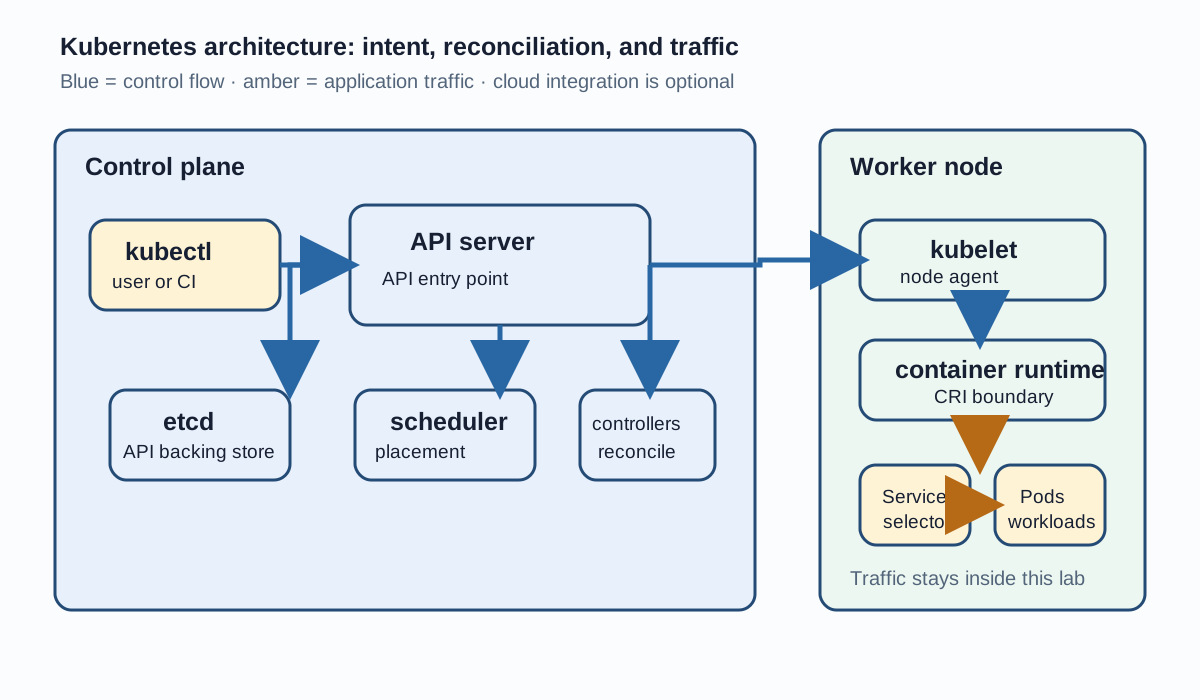
Kubernetes control plane and worker node request-flow diagramContents
Kubernetes architecture is a set of cooperating components that turns a declared application state into running workloads. This guide uses current control-plane terminology and a version-neutral model; exact defaults vary by Kubernetes version and distribution.
What Kubernetes architecture consists of
A cluster is commonly described as a control plane plus one or more nodes. The control plane exposes and coordinates the Kubernetes API. Nodes provide the execution environment for Pods. In production, workloads are commonly separated from control-plane responsibilities; development or constrained clusters can combine them when their configuration permits it.
Area
Responsibility
Control plane
Accept API requests, store object state, schedule Pods, and reconcile desired state.
Node
Run assigned Pod containers and report status through the node agent.
Service path
Provide stable discovery and traffic routing to selected Pods.
Optional integrations
Connect cluster control to a cloud provider or installed networking stack when configured.
Desired state and reconciliation
Kubernetes objects describe desired state. Controllers repeatedly compare that state with observations and make bounded changes toward convergence. A Deployment, for example, manages ReplicaSets; a ReplicaSet creates and replaces Pods to maintain its requested count. This is reconciliation, not a one-time script.
Control plane components
kube-apiserver
The API server is the front door for Kubernetes API usage. kubectl, controllers, schedulers, operators, and other clients authenticate and authorize requests through it. Admission and validation can further shape an accepted object before it is stored.
etcd
etcd is the authoritative backing store for Kubernetes API data. Treat it as an implementation component: operators should use supported Kubernetes APIs and backup procedures rather than editing etcd directly.
kube-scheduler
The scheduler finds suitable nodes for unscheduled Pods. It considers requests, constraints, affinity, taints and tolerations, policies, topology, and available capacity—not CPU alone—before binding a Pod to a node.
kube-controller-manager
The controller manager runs control loops for built-in resources. Each loop observes API state and works toward the resource's desired state, so temporary differences can be normal during rollout or recovery.
cloud-controller-manager, when applicable
A cloud controller manager is environment-dependent. When a cluster integrates with a cloud provider, it can reconcile provider-specific concerns such as nodes, routes, or load balancers. A cluster without that integration does not require this component.
Worker-node components
kubelet
The kubelet is the node agent. It receives assigned Pod specifications through the cluster control path and works with the container runtime to ensure the Pod's containers are running and reported status is current.
Container runtime and CRI
The Container Runtime Interface (CRI) is the integration boundary between kubelet and a compatible container runtime. The runtime handles image and container operations; Kubernetes does not require one particular runtime implementation.
Service networking and kube-proxy alternatives
kube-proxy is a common Service traffic implementation, but it is not universally mandatory. Some networking stacks provide equivalent Service handling. Check the cluster's networking design before assuming which component owns packet routing.
Control flow is shown in blue; application traffic through a Service is shown in amber. Cloud integrations are optional.
Pods, Deployments, ReplicaSets and Services
Pods are the smallest deployable unit. A Deployment manages ReplicaSets, and a ReplicaSet manages a matching set of Pods. A Service selects Pods through labels and provides stable discovery and access while individual Pod identities can change.
What happens after kubectl apply
kubectl authenticates to the API server and submits the manifest.
The API server validates, authorizes, and admits the object, then stores API data in etcd.
Controllers notice the desired state and create or update dependent objects.
The scheduler selects a suitable node for an unscheduled Pod using constraints and available capacity.
The kubelet on that node asks the runtime to make the containers run and reports status back through the API server.
Deployment YAML example
This example uses a dedicated namespace, a safe placeholder image, matching labels, and modest resource requests. Review image provenance and policy before using any manifest in a real cluster.
A ClusterIP Service keeps this lab inside the cluster. Its selector must match the Pod-template label; it does not expose the application to the public internet.
For management, kubectl sends a request to the API server, which persists and distributes the resulting state. For application traffic inside the lab, a client resolves the Service and sends a request to its ClusterIP; the configured Service dataplane selects a ready Pod and forwards traffic to its named port. External exposure requires an explicitly configured Ingress, Gateway, or load-balancing path and its security review.
High-availability considerations
High availability is a topology and operations decision, not a single switch. Production designs commonly spread control-plane instances and workloads across failure domains, protect etcd quorum, provide reliable API access, and rehearse backups and recovery. The exact design depends on the distribution, provider, and failure model.
Safe architecture-inspection commands
inspect.sh
kubectl cluster-info
kubectl get nodes -o wide
kubectl describe node <node-name>
kubectl get pods -n kube-system
kubectl get deployments,replicasets,pods -n architecture-demo
kubectl get services -n architecture-demo
kubectl get events -n architecture-demo --sort-by=.metadata.creationTimestamp
kubectl logs deployment/architecture-demo -n architecture-demo --all-containers=true
kubectl rollout status deployment/architecture-demo -n architecture-demo
Common architecture mistakes
Treating the control plane as a magical boundary instead of a set of API-driven components.
Assuming kube-proxy is mandatory in every networking implementation.
Expecting a Deployment to manage containers directly instead of through ReplicaSets and Pods.
Using a Service selector that does not match Pod labels.
Assuming a ClusterIP Service is an internet-facing endpoint.
Inspecting or editing etcd directly instead of using supported APIs and backup procedures.
Running cluster-wide or kube-system deletion commands while troubleshooting.
Practical verification lab
Create or select an authorized test context and create the architecture-demo namespace.
Apply deployment.yaml and service.yaml with the namespace-aware commands below.
Check the Deployment, ReplicaSet, Pods, Service, rollout status, events, and logs.
From an authorized client inside the cluster, verify the ClusterIP path without exposing a public endpoint.
Compare the observed objects with the diagram and the desired-to-observed flow.
verify.sh
kubectl create namespace architecture-demo
kubectl apply -f deployment.yaml -n architecture-demo
kubectl apply -f service.yaml -n architecture-demo
kubectl get deployment,replicaset,pods,service -n architecture-demo
kubectl describe deployment architecture-demo -n architecture-demo
kubectl scale deployment architecture-demo --replicas=3 -n architecture-demo
# Cleanup is destructive: run only in the disposable lab namespace after review.
# kubectl delete namespace architecture-demo
Troubleshooting checklist
If kubectl cannot connect, inspect the selected context and API endpoint without sharing credentials.
If a Pod is Pending, inspect events, requests, constraints, taints, and node capacity.
If a Pod is not Ready, inspect its status and logs, then check probes and configuration.
If a Service has no endpoints, compare its selector with the Pod labels and readiness.
If rollout status stalls, inspect the Deployment, ReplicaSet, events, and the affected Pod.
Best practices
Keep manifests declarative, reviewed, versioned, and namespace-aware.
Set realistic requests and limits, then verify behavior under the target policy.
Use least-privilege access and keep credentials out of shell history, manifests, and logs.
Use labels consistently so Deployments, Services, and inspection queries remain explainable.
Validate the installed distribution and Kubernetes version before relying on an implementation detail.
Conclusion
The useful mental model is a control plane that accepts API intent, stores it, reconciles it, and assigns work to nodes whose kubelets run the resulting Pods. Deployments, ReplicaSets, Services, and networking components then connect desired state to resilient application behavior.
Related learning sequence
Next, study Pods and their lifecycle, then use the kubectl command guide to practice safe inspection and rollout workflows. Compare foundational Kubernetes concepts only after these drafts have been reviewed for overlap.









No comments yet. Start the discussion.