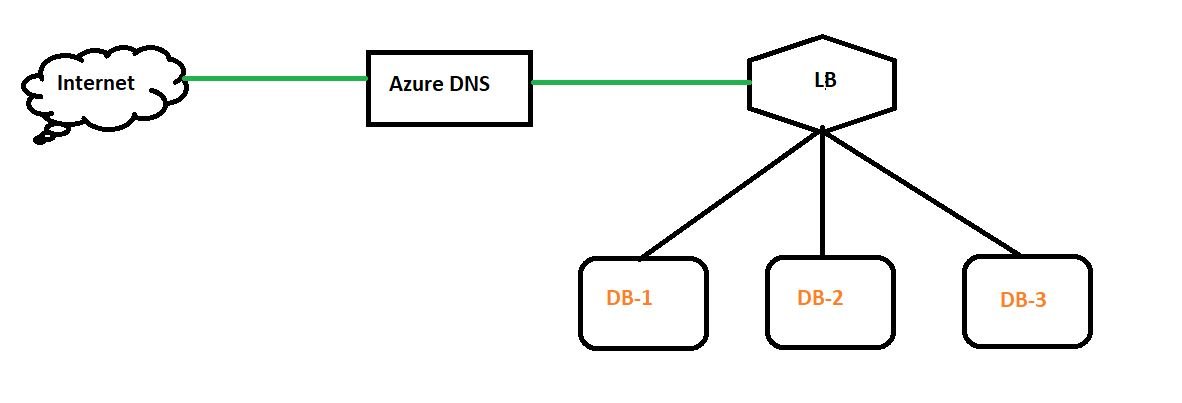
Azure Load Balancer architecture showing frontend IP, backend pool, health probes and traffic distributionContents
Last reviewed: August 2026. Azure Load Balancer is Microsoft Azure's Layer 4 load-balancing service for distributing TCP and UDP traffic across healthy backend instances. It is commonly used in front of virtual machines and virtual machine scale sets when you need high availability, low latency, and transport-layer load balancing without inspecting HTTP paths, headers, or cookies.
What is Azure Load Balancer?
Azure Load Balancer operates at Layer 4 of the OSI model. It makes forwarding decisions using network and transport information such as source IP, source port, destination IP, destination port, and protocol. It does not perform Layer 7 application routing such as URL-path or host-header routing; Azure Application Gateway is designed for that type of workload.
A typical design has a frontend IP, a backend pool, a health probe, and one or more load-balancing rules. Client traffic reaches the frontend IP, Azure checks which backend instances are healthy, and new flows are distributed to eligible backends.
Azure Load Balancer types
Public Load Balancer
A public load balancer exposes a public frontend IP and distributes internet-originated TCP or UDP traffic to backend resources.
Internal Load Balancer
An internal load balancer uses a private frontend IP inside a virtual network. It is useful for private application tiers, internal APIs, databases, and middleware that must be reached only from trusted networks.
Standard vs Gateway SKU
Standard Load Balancer: recommended for production TCP/UDP load balancing.
Gateway Load Balancer: designed for NVA and service-chaining scenarios.
Basic Load Balancer: retired; do not use for new deployments.
Core components
Frontend IP configuration: the address clients connect to. Public load balancers use a public IP resource; internal load balancers use a private IP from the virtual network.
Backend pool: virtual machines, virtual machine scale set instances, or eligible IP configurations that receive traffic.
Health probe: TCP, HTTP, or HTTPS checks that decide whether a backend instance can receive new connections.
Load-balancing rule: connects a frontend IP and port to a backend pool and backend port, referencing a health probe.
Inbound NAT rule: port forwarding to a specific backend instance, commonly for SSH or RDP.
Outbound rule: explicit SNAT configuration for backend instances through a public Standard Load Balancer.
Reference architecture
azure-load-balancer-architecture.txt
Internet / Private Client
          |
          v
+-------------------------+
| Azure Load Balancer     |
| Frontend IP : TCP/UDP   |
+-------------------------+
          |
     Health Probe
          |
   +------+------+
   |             |
   v             v
+------+       +------+
| VM 1 |       | VM 2 |
+------+       +------+
 Backend Pool
Create a Standard public Azure Load Balancer in the portal
Create or identify a resource group and virtual network.
Deploy at least two backend VMs or use a virtual machine scale set.
Open Azure portal > Load balancers > Create.
Select the subscription, resource group, region, and a descriptive name.
Select Standard SKU.
Select Public for an internet-facing design or Internal for private traffic.
Create the frontend IP configuration. For a public load balancer, use a Standard public IP.
Create a backend pool and add the VM NICs or scale set.
Create a health probe, for example TCP 80 or HTTP/HTTPS on an application health endpoint.
Create a load-balancing rule that maps the frontend port to the backend port and associates the health probe.
Confirm the VM Network Security Groups allow the required application traffic and Azure health-probe traffic.
Test the frontend IP and verify that traffic reaches only healthy backend instances.
Azure CLI example
The following example shows the basic flow for a public Standard Load Balancer. Adjust names, region, ports, and network objects to match your environment.
create-azure-load-balancer.sh
RG=melochip-lb-rg
LOCATION=eastus
LB=melochip-lb
PIP=melochip-lb-pip
POOL=web-backend
PROBE=web-health

az group create --name $RG --location $LOCATION

az network public-ip create --resource-group $RG --name $PIP --sku Standard --allocation-method Static

az network lb create --resource-group $RG --name $LB --sku Standard --public-ip-address $PIP --frontend-ip-name LoadBalancerFrontEnd --backend-pool-name $POOL

az network lb probe create --resource-group $RG --lb-name $LB --name $PROBE --protocol Tcp --port 80

az network lb rule create --resource-group $RG --lb-name $LB --name http-rule --protocol Tcp --frontend-port 80 --backend-port 80 --frontend-ip-name LoadBalancerFrontEnd --backend-pool-name $POOL --probe-name $PROBE
After creating the load balancer, add the intended NIC IP configurations or scale-set instances to the backend pool.
Health probe example
For a simple web server, TCP port 80 can confirm that something is listening. For a more reliable application-aware check, expose an HTTP/HTTPS health endpoint such as /health that returns success only when the application is ready to receive traffic.
If all probes fail, troubleshoot the application listener, NSG rules, guest firewall, routing, probe port, and backend pool membership.
Inbound NAT rules: when to use them
Use inbound NAT rules when you need direct administrative or service access to a particular backend instance through the load balancer frontend.
Frontend TCP 50001 -> VM1 TCP 22
Frontend TCP 50002 -> VM2 TCP 22
For fleets and scale sets, prefer the current inbound NAT rule model rather than designing around legacy NAT pools.
Outbound connectivity
Do not assume that placing VMs behind a Standard Load Balancer automatically gives them a safe, future-proof outbound path. Define outbound connectivity explicitly. Common options include Azure NAT Gateway, Standard Load Balancer outbound rules, or an instance-level public IP where appropriate.
For most private application subnets that need scalable outbound internet connectivity, NAT Gateway is usually the simpler dedicated egress design.
Network Security Groups
The load balancer does not replace an NSG. The NSG on the subnet or NIC must still permit the required application traffic. If the health probe cannot reach the backend service, the VM can remain unhealthy even while the application is running locally.
Common troubleshooting checks
Backend shows unhealthy: verify the service is listening on the probe port and the NSG or guest firewall allows the probe.
Frontend IP does not respond: verify the load-balancing rule, frontend IP, backend pool, and application listener.
Only one VM receives traffic: verify all intended instances are in the backend pool and all probes are healthy.
RDP or SSH fails through NAT: verify the inbound NAT rule frontend port, backend port, NSG, and OS firewall.
VM cannot reach the internet: check whether an explicit outbound method such as NAT Gateway or an outbound rule exists.
Wrong service choice: if you need URL routing, TLS termination, WAF, or cookie affinity, evaluate Application Gateway instead.
Azure Load Balancer vs Application Gateway vs Front Door vs Traffic Manager
Service
Layer / Method
Best use
Azure Load Balancer
Layer 4 TCP/UDP
Regional transport-layer load balancing
Application Gateway
Layer 7 HTTP/HTTPS
Web routing, TLS termination, WAF
Azure Front Door
Global Layer 7 edge service
Global web acceleration, routing, WAF
Traffic Manager
DNS-based
Global DNS traffic steering and failover
Best practices
Use Standard Load Balancer for production workloads.
Use zone-redundant frontend configuration where the region and architecture support it.
Create meaningful HTTP/HTTPS health endpoints for applications rather than checking only whether a TCP port is open.
Define outbound connectivity explicitly.
Use least-privilege NSG rules.
Monitor health, data path metrics, SNAT usage, and backend availability.
Use Application Gateway when Layer 7 routing or WAF is required instead of forcing that requirement into a Layer 4 design.
Frequently asked questions
Is Azure Load Balancer Layer 4 or Layer 7?
Azure Load Balancer is primarily a Layer 4 service for TCP and UDP traffic. Azure Application Gateway and Azure Front Door provide Layer 7 capabilities for HTTP/HTTPS workloads.
Can Azure Load Balancer be private?
Yes. An internal load balancer uses a private frontend IP and is commonly used for private multi-tier applications.
Should I still use Basic Load Balancer?
No for new designs. Basic Load Balancer was retired on September 30, 2025. Use Standard Load Balancer for normal production workloads.
Does an inbound NAT rule require a health probe?
No. Inbound NAT rules provide direct port forwarding and do not require a health probe.
Related Melochip guides: Create a VM in Azure, Azure Application Gateway, Azure Traffic Manager, and Azure Front Door can be linked after those posts are migrated.









No comments yet. Start the discussion.