Kubernetes volumes, PersistentVolumes and PersistentVolumeClaims workflowContents
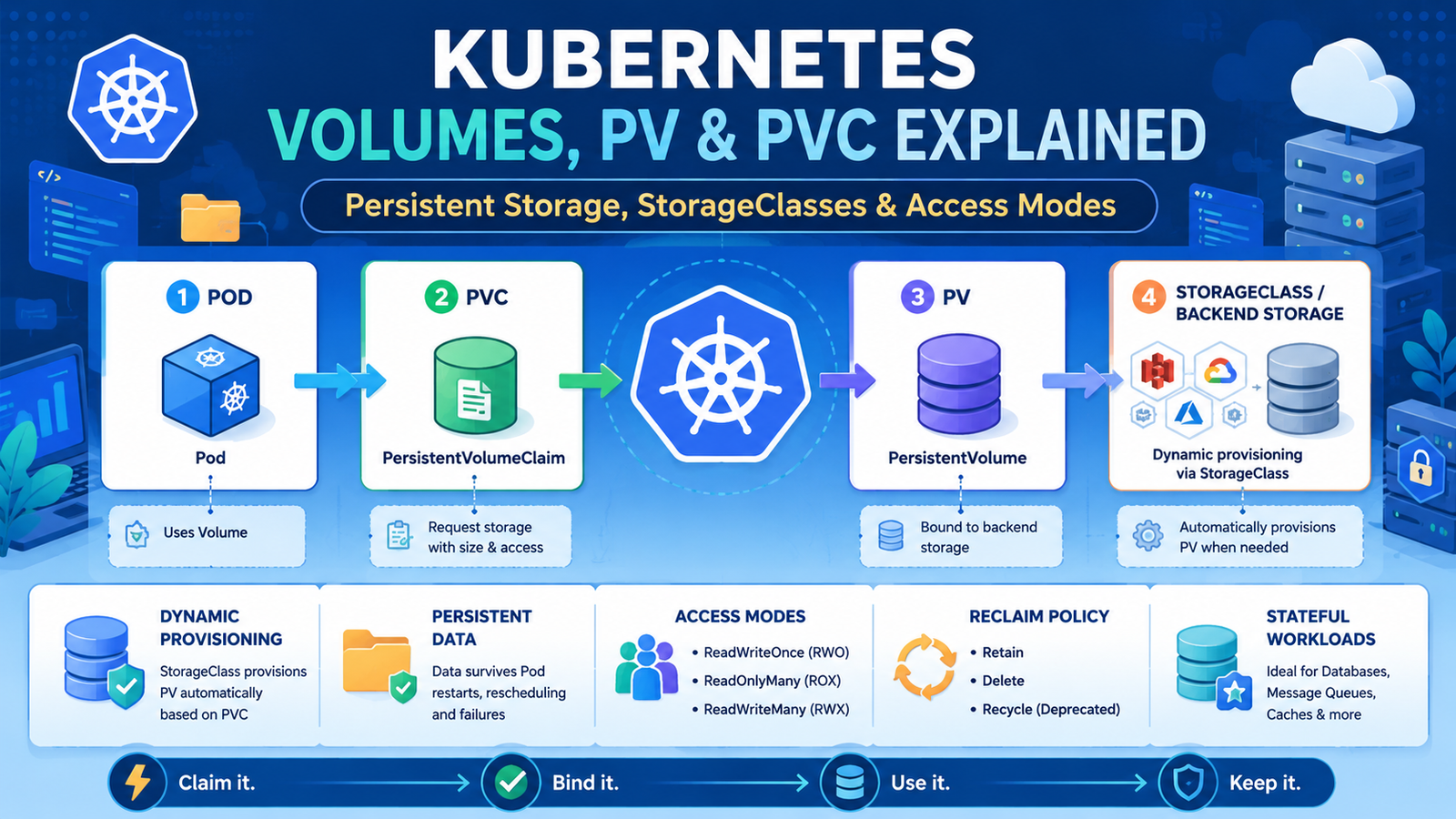
Kubernetes Volumes, PV and PVC Explained
Learn how Kubernetes keeps application data beyond Pod restarts using Volumes, PersistentVolumes, PersistentVolumeClaims and StorageClasses.
Why Kubernetes storage is different
Containers and Pods are replaceable. A container filesystem normally disappears when the container is recreated. A Pod may also move to another node during rescheduling. Persistent storage separates application data from the lifecycle of a specific container or Pod.
Ephemeral data
Temporary files, caches and scratch space that may disappear with the Pod.
Persistent data
Database files, uploaded documents and application state that must survive Pod replacement.
External storage
Cloud disks, network filesystems, CSI-backed storage and other systems mounted into workloads.
The storage relationship
Volume, PV, PVC and StorageClass
Object — Purpose — Managed by
Volume — Makes storage available inside a Pod. — Workload author
PersistentVolume — Represents cluster storage with capacity and access rules. — Administrator or dynamic provisioner
PersistentVolumeClaim — Requests storage with a size, access mode and optional StorageClass. — Application team
StorageClass — Defines how storage is dynamically provisioned. — Cluster or platform team
Common volume types
emptyDir : temporary storage shared by containers in one Pod.
configMap and secret : mount configuration data as files.
persistentVolumeClaim : attach persistent storage requested through a PVC.
hostPath : mounts a node path and should generally be avoided for portable production workloads.
CSI volumes: storage supplied through a Container Storage Interface driver.
ReadWriteOncePod (RWOP) — Read-write by a single Pod where supported. — Strict single-writer workloads.
Dynamic provisioning with StorageClass
Dynamic provisioning removes the need to create each PV manually. When a PVC references a StorageClass, the CSI provisioner creates suitable storage automatically.
Immediate provisions storage as soon as the claim is created. WaitForFirstConsumer delays binding until a Pod uses the claim, allowing Kubernetes to consider node topology and availability zones before selecting storage.
PV and PVC lifecycle
A PVC is created and enters Pending .
Kubernetes finds or provisions a compatible PV.
The PV and PVC become Bound .
A Pod mounts the claim.
When the claim is deleted, the reclaim policy determines what happens to the underlying storage.
Reclaim policies
Policy — Behavior after PVC deletion — Use carefully because
Retain — The PV and underlying data are kept for manual recovery or cleanup. — An administrator must deliberately reclaim or delete the data.
Delete — The provisioned storage is normally deleted with the PV. — Deleting a PVC may permanently delete the underlying data.
Expand a PersistentVolumeClaim
Expansion works only when the StorageClass and CSI driver support it.
StatefulSets are often used for databases and clustered stateful applications because they provide stable Pod identities and can create one PVC per replica through volumeClaimTemplates .
kubectl get pv
kubectl get pvc -A
kubectl describe pvc app-data -n dev
kubectl describe pv app-pv
kubectl get storageclass
kubectl get events -n dev --sort-by=.lastTimestamp
kubectl get pod web-POD -n dev -o yaml
Why is my PVC Pending?
Cause — What to inspect — Typical correction
No matching PV — Requested size, access mode and StorageClass — Create a compatible PV or use dynamic provisioning.
StorageClass missing — kubectl get storageclass — Use an available class or configure a default class.
CSI provisioner failure — Events and CSI controller logs — Fix driver credentials, permissions, topology or quotas.
Topology conflict — Node zone and volume zone — Use WaitForFirstConsumer where suitable.
Insufficient capacity — PV capacities and backend limits — Request a supported size or add storage capacity.
Troubleshoot mount failures
kubectl describe pod APP_POD -n dev
kubectl get events -n dev --sort-by=.lastTimestamp
kubectl describe pvc app-data -n dev
kubectl describe pv PV_NAME
kubectl get volumeattachments
Common messages include FailedMount , FailedAttachVolume , multi-attach errors, missing CSI drivers and permission problems inside the mounted filesystem.
Backups and snapshots
A PV is not a backup. Protect important data using application-aware backups, database dumps, replication and CSI VolumeSnapshots where supported. Test restores regularly; a backup that has never been restored is only an assumption.
Common mistakes
Running a database only on the container filesystem.
Assuming all StorageClasses support RWX or volume expansion.
Deleting a PVC without checking the reclaim policy.
Using hostPath for production data that must survive node failure.
Creating multiple replicas that all expect exclusive write access to one RWO volume.
Treating snapshots as the only backup strategy.
Ignoring storage capacity and inode monitoring.
Production best practices
Use a supported CSI driver and documented StorageClasses.
Choose access modes based on the storage backend and application design.
Prefer WaitForFirstConsumer for topology-aware block storage.
Use dedicated PVCs for important stateful workloads.
Encrypt storage and protect backup credentials.
Monitor capacity, latency, IOPS, filesystem usage and failed mount events.
Document reclaim policies and deletion procedures.
Test failover, backup and restore before production incidents.









No comments yet. Start the discussion.