
Last reviewed: September 2026
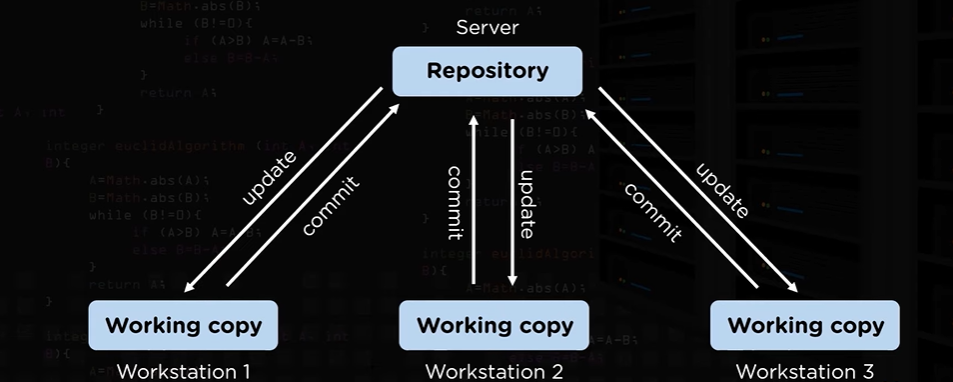
GitHub is a cloud platform for hosting Git repositories and collaborating on software. Git records file history locally; GitHub stores remote repositories and adds pull requests, code review, issues, automation, permissions and security features.
Git and GitHub are different
| Git | GitHub |
|---|---|
| Version-control software | Hosted collaboration platform built around Git |
| Runs locally | Hosts remote repositories |
| Tracks commits and branches | Adds reviews, issues, Actions and access controls |
| Can work without a network | Connects contributors and automation |
Core concepts
| Concept | Purpose |
|---|---|
| Repository | Project files, configuration and Git history |
| Commit | Recorded snapshot with author, timestamp and message |
| Branch | Independent line of work based on a commit |
| Remote | Named connection to another repository, commonly origin |
| Pull request | Proposal to review and merge branch changes |
| Issue | Tracked bug, task, request or discussion |
| Fork | Independent server-side copy used for contribution or experimentation |
Configure Git
Install Git using the supported package for your operating system. Set the name and email recorded in new commits, select main as the default initial branch, and review the resulting configuration. A repository can override global settings when a different identity is required.
Create and publish a repository
- Create an empty repository on GitHub if the local project already contains files.
- Open a terminal in the local project directory and initialize Git.
- Review files and add an appropriate ignore file.
- Stage only the intended files and create a focused initial commit.
- Add the GitHub repository as the origin remote.
- Push the main branch and confirm the files appear correctly.
Before the first commit, check for local configuration, generated output, large binaries and information that does not belong in source control.
Clone an existing repository
Copy the HTTPS or SSH repository address from GitHub and use Git clone. The clone contains the project files and history and normally configures a remote named origin. Follow the repository's contribution and setup documentation before changing files.
Work on a feature branch
- Update the local main branch using the team's approved policy.
- Create a short-lived branch with a descriptive name.
- Make one focused change and inspect the working tree and diff.
- Stage only related files and create a meaningful commit.
- Push the feature branch and open a pull request.
A good pull request explains the purpose, scope, test evidence, risk and deployment notes. Keep unrelated changes out of the same request.
Review and merge pull requests
- Use draft status while work is incomplete.
- Request review from people who understand the affected area.
- Respond to comments with code changes or a clear explanation.
- Require automated checks that reflect the repository's quality gates.
- Resolve conversations only after the concern is addressed.
- Use the team's approved merge method and remove obsolete branches.
Connect securely
For command-line access, follow GitHub's current documentation for HTTPS with GitHub CLI or a supported credential manager, or configure SSH. Choose the method required by your organization and limit access to the necessary repositories and actions.
- Enable two-factor authentication and protect recovery methods.
- Do not place access details in repository files or build logs.
- Use the narrowest permissions that support the task.
- Set expiration and rotation policies where supported.
- Remove access promptly when it is no longer required.
Useful Git commands
| Command | Purpose |
|---|---|
| git status | Show staged, modified and untracked files |
| git diff | Show unstaged changes |
| git diff --staged | Show changes prepared for commit |
| git log --oneline --graph --all | Display compact branch history |
| git fetch --prune | Download remote references and remove stale tracking references |
| git pull --ff-only | Update only when no merge commit is required |
| git switch BRANCH | Move to another branch |
Resolve common problems
- Access failed: inspect the remote address and confirm that the selected connection method has repository access.
- Push rejected: fetch current history and integrate it using the team's approved policy.
- Merge conflict: read both versions, keep the intended result, test it and obtain review when uncertain.
- Unexpected files staged: review the staging area and remove unrelated files before committing.
Recommended team controls
- Protect important branches and require pull requests.
- Require relevant reviews and status checks.
- Use CODEOWNERS where ownership rules are useful.
- Keep commits focused and messages meaningful.
- Run tests, linting and security checks before merge.
- Limit administrative permissions and review access regularly.
- Use verified commits or workflows where policy calls for them.
- Back up critical repository and release assets according to business requirements.
Practice workflow
- Create a small repository with a README and ignore file.
- Create a feature branch and make one focused change.
- Inspect the diff and commit it with a meaningful message.
- Push the branch and open a pull request.
- Review the change, run checks and merge it.
- Update the local main branch and remove the obsolete feature branch.
Official references
Join the discussion
0 CommentsAsk questions, add context, or share what worked.
More from Melochip Editorial

Learn what Playwright testing is, why modern QA teams use it, how testers can get started, and the major types...
7 min read · Sep 19, 2026

Learn how Kubernetes Deployments and ReplicaSets work with practical YAML, scaling, self-healing, rolling upda...
7 min read · Sep 17, 2026

Learn Kubernetes security best practices with RBAC, Secrets, ServiceAccounts, Pod securityContext, NetworkPoli...
6 min read · Sep 17, 2026Related articles

Learn what Playwright testing is, why modern QA teams use it, how testers can get started, and the major types...
7 min read · Sep 19, 2026
Learn how Kubernetes Deployments and ReplicaSets work with practical YAML, scaling, self-healing, rolling upda...
7 min read · Sep 17, 2026
Learn Kubernetes security best practices with RBAC, Secrets, ServiceAccounts, Pod securityContext, NetworkPoli...
6 min read · Sep 17, 2026
Learn Kubernetes monitoring and logs with kubectl logs, events, metrics-server, top commands, Prometheus, Graf...
5 min read · Sep 17, 2026Stay in the loop. Get new Melochip articles
Receive Melochip article updates when new articles are available. Explicit opt-in only.
No comments yet. Start the discussion.