VMware vSphere High Availability cluster configuration and failover capacityContents
Last reviewed: September 2026
A VMware vSphere cluster groups ESXi hosts under vCenter Server so virtual machines can use shared availability, mobility and resource-management capabilities. The most important cluster services are vSphere High Availability, Distributed Resource Scheduler and vMotion.
Core cluster services
Capability
Primary purpose
Expected VM interruption
vSphere HA
Restart affected virtual machines after a host or selected service failure
A restart normally causes an outage
vSphere DRS
Recommend or perform placement and balancing across hosts
Normally none when movement uses vMotion
vMotion
Move a running virtual machine between compatible hosts
Designed for live migration
Storage vMotion
Move virtual disks between compatible datastores
Designed for live storage migration
EVC
Present a compatible CPU feature baseline across hosts
Helps preserve migration compatibility
vSphere High Availability
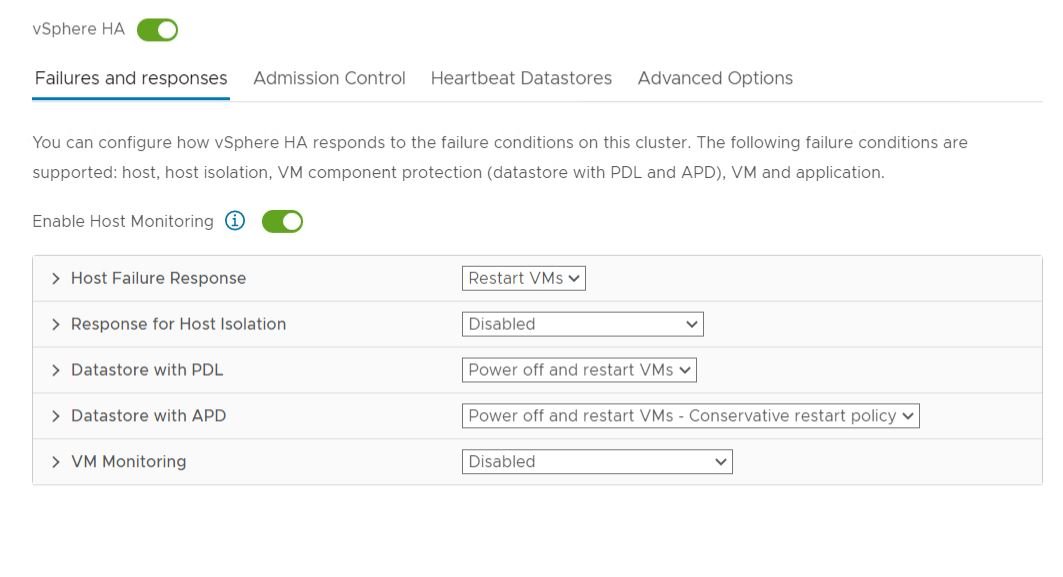
vSphere HA monitors hosts and protected virtual machines. When an ESXi host fails, HA can restart affected virtual machines on surviving hosts with sufficient capacity. HA is not the same as fault tolerance: applications experience the time required to detect the failure and restart the guest.
Fault Domain Manager
The Fault Domain Manager agent participates in HA monitoring and coordination on each cluster host. The cluster elects a primary host to coordinate protected virtual machines and host state. Administrators should rely on the current cluster health and agent status rather than designing operations around a specific elected host.
Admission control
Admission control reserves or evaluates cluster capacity so configured host failures can be tolerated. A design that enables HA but leaves no spare compute capacity may be unable to restart all protected workloads after a host failure.
Choose a policy that matches the number and size of hosts.
Include reservations and unusually large virtual machines in capacity calculations.
Test whether the largest protected workloads can restart on remaining hosts.
Monitor admission-control warnings after adding workloads or changing reservations.
Do not disable capacity protection merely to power on another VM without assessing risk.
Host isolation
A host can remain powered on while losing management-network connectivity. Configure isolation addresses, redundant management networking and isolation responses intentionally. Storage and application behavior must be considered before choosing whether isolated-host virtual machines remain powered on, shut down or power off.
Datastore failures
Permanent Device Loss indicates an unrecoverable loss reported by the storage system.
All Paths Down indicates that no storage path is currently available and recovery may still be possible.
VM Component Protection can respond to selected datastore accessibility failures when configured.
Storage multipathing, timeouts and array behavior must align with the cluster response.
VM and application monitoring
VM Monitoring can reset a guest when expected VMware Tools heartbeats are absent. Application Monitoring depends on application heartbeats. Configure conservative thresholds and test them, because aggressive settings can restart a busy but healthy workload.
Distributed Resource Scheduler
DRS evaluates resource demand, reservations, limits, shares and host capacity. It recommends or performs placement and migration actions to improve cluster balance while respecting rules and compatibility.
Automation levels
Level
Behavior
Manual
Provides initial-placement and migration recommendations for administrator action
Partially automated
Performs initial placement and provides migration recommendations
Fully automated
Performs initial placement and eligible balancing migrations automatically
Migration threshold
The migration threshold controls how strongly DRS reacts to imbalance relative to migration cost. More aggressive settings can increase vMotion frequency; conservative settings allow a wider balance range before action.
VM-host rules place or prefer workloads on defined host groups.
Mandatory rules can prevent power-on or placement when no compliant host is available.
Rules should express real availability or licensing requirements, not cosmetic preferences.
vMotion requirements
Compatible source and destination hosts
Working vMotion VMkernel networking
Sufficient destination compute capacity
Appropriate storage access or a supported storage migration path
Compatible virtual switches, port groups and security settings
CPU compatibility, potentially assisted by EVC
Consistent time, DNS and management connectivity
A successful ping is not sufficient validation. Check MTU consistency, routing, physical uplinks, switch configuration and the selected vMotion service on every participating VMkernel adapter.
Enhanced vMotion Compatibility
EVC establishes a CPU feature baseline that helps virtual machines migrate across hosts with different processor generations from the same compatible vendor family. Select the highest baseline supported by all intended hosts and required workloads, then validate application requirements before changing it.
Maintenance mode
Confirm cluster capacity and rule compliance.
Migrate or shut down virtual machines according to policy.
Handle powered-off and template workloads if required.
Verify datastore and networking dependencies.
Place the host into maintenance mode.
Perform the planned change and validation.
Exit maintenance mode and confirm HA, DRS, storage and networking health.
Cluster design best practices
Use redundant management, vMotion and storage paths.
Maintain enough spare capacity for the declared failure target.
Keep host firmware, drivers, ESXi builds and compatibility aligned.
Use consistent networking and datastore presentation.
Separate critical workloads with tested anti-affinity rules.
Monitor capacity, contention, HA health and vMotion failures.
Back up vCenter and document recovery dependencies.
Test host-failure and maintenance procedures during controlled exercises.
Common troubleshooting
HA agent unavailable: check management networking, DNS, time, certificates and cluster reconfiguration events.
Insufficient failover resources: review admission control, reservations and current host capacity.
vMotion compatibility error: inspect CPU features, EVC, device attachments and destination configuration.
vMotion timeout: verify VMkernel routing, MTU, uplinks and network congestion.
DRS does not move a VM: review automation level, rules, reservations, host compatibility and migration cost.
VM restart fails after host loss: confirm accessible storage, port groups, capacity and protection status.
Validation checklist
Every host reports healthy HA status.
Admission control meets the documented failure target.
vMotion succeeds between every intended host pair.
DRS rules are valid and do not conflict.
Management, storage and vMotion paths are redundant.
A controlled host-maintenance test completes successfully.
Monitoring alerts on host, storage and cluster-service failures.








No comments yet. Start the discussion.