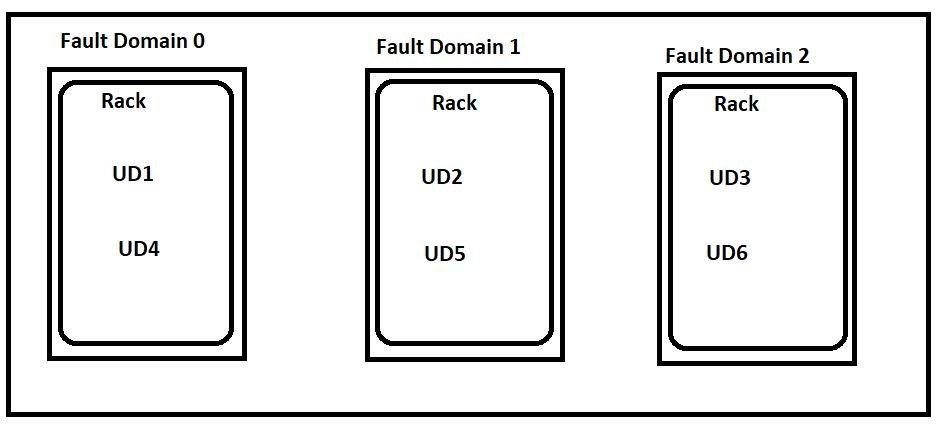
Azure Availability Set diagram showing fault domains and update domains for virtual machine high availabilityContents
Last reviewed: August 2026
An Azure Availability Set is a logical grouping of virtual machines designed to reduce the chance that correlated hardware failures or planned platform maintenance affect all related VMs at the same time.
Availability Sets are still supported and useful, but Microsoft now recommends Virtual Machine Scale Sets with Flexible orchestration for high availability with the widest feature set. Availability Zones provide stronger isolation than Availability Sets because zones are physically separate datacenter locations within an Azure region.
What an Availability Set does
When you place two or more VMs in an Availability Set, Azure distributes them across fault domains and update domains. This helps ensure that not all application instances are affected by a single rack-level failure or planned maintenance event.
There is no additional charge for the Availability Set resource itself; you pay for the VMs, disks, networking and other resources.
Fault domains
A fault domain represents a group of hardware that shares common infrastructure such as power and networking. Azure spreads VMs in an Availability Set across fault domains to reduce correlated hardware failure risk.
The number of available fault domains depends on the Azure region and deployment configuration; do not assume every region always provides exactly the same count.
Update domains
An update domain is a logical group used by Azure during planned platform maintenance. Azure assigns VMs to update domains so platform updates can be applied in stages instead of rebooting every VM in the Availability Set at once.
Availability Sets can support multiple update domains, commonly up to 20 depending on the configuration.
Availability Set SLA
Microsoft documents a 99.95% virtual machine connectivity SLA when two or more VMs are deployed in the same Availability Set and the workload meets the applicable SLA conditions. Always check the current Azure SLA for the exact workload before using the number in an architecture commitment.
Availability Set vs Availability Zone
Feature
Availability Set
Availability Zone
Isolation level
Fault/update domains inside a region
Physically separate datacenter zones
Datacenter-level failure protection
Limited
Yes, when workload spans zones
Typical use
Legacy/regional HA or regions without zones
Preferred stronger resiliency for zonal workloads
Latency
Often lower VM-to-VM latency
May be slightly higher across zones
Availability Set vs VM Scale Set
Virtual Machine Scale Sets provide centralized management for groups of VMs and can also support autoscaling. Flexible orchestration can work with standard Azure VMs and provides broader high-availability capabilities than classic Availability Sets.
For modern production designs where you need high availability, scaling and centralized lifecycle management, evaluate VM Scale Sets Flexible orchestration first.
When to use Availability Sets
You have an existing architecture already built around Availability Sets.
The Azure region or workload does not use Availability Zones.
You need regional fault-domain separation but not zone-level datacenter isolation.
You are maintaining a legacy architecture that cannot yet migrate to VM Scale Sets.
When to prefer Availability Zones
You need protection from a datacenter-level power, cooling or network failure.
The selected VM sizes and region support zones.
You can deploy at least two application instances across separate zones.
When to prefer VM Scale Sets
You need autoscaling.
You manage many similar VM instances.
You want centralized deployment and lifecycle management.
You want Flexible orchestration and broader modern HA capabilities.
Create an Availability Set with Azure CLI
create-availability-set.sh
RG=melochip-avset-rg
LOCATION=eastus
AVSET=melochip-web-avset

az group create --name $RG --location $LOCATION

az vm availability-set create \
  --resource-group $RG \
  --name $AVSET \
  --location $LOCATION
Create VMs in an Availability Set
create-vms-in-availability-set.sh
az vm create \
  --resource-group $RG \
  --name web01 \
  --image Ubuntu2204 \
  --availability-set $AVSET \
  --admin-username azureuser \
  --generate-ssh-keys

az vm create \
  --resource-group $RG \
  --name web02 \
  --image Ubuntu2204 \
  --availability-set $AVSET \
  --admin-username azureuser \
  --generate-ssh-keys
Can you add an existing VM to an Availability Set?
An existing VM cannot simply be attached to an Availability Set in place. The VM generally needs to be recreated while preserving the appropriate disks and networking, or the workload should be migrated to a modern architecture such as a VM Scale Set where appropriate.
Migrating from Availability Sets
Azure provides migration options from Availability Sets to Virtual Machine Scale Sets. The portal also offers guided migration for supported scenarios. This is worth evaluating for older environments that need newer orchestration and zone-aware capabilities.
Common mistakes
Assuming an Availability Set protects against full datacenter failure.
Deploying only one VM and expecting high availability.
Treating Availability Sets as a replacement for application-level redundancy.
Ignoring load balancing between redundant application instances.
Choosing Availability Sets automatically when Availability Zones or Flexible Scale Sets would better meet the requirement.
Best practices
Use at least two application instances for an HA design.
Prefer Availability Zones when you need datacenter-level isolation and the workload supports them.
Evaluate VM Scale Sets Flexible orchestration for modern VM fleets.
Place a suitable load balancer in front of redundant application instances.
Design stateful workloads with independent data replication and backup; VM placement alone is not disaster recovery.









No comments yet. Start the discussion.